Deployment Models
KubeSlice provides flexible deployment options to meet different needs. The following are the deployment models in KubeSlice:
- Single cluster deployment
- Multi cluster deployment
Single Cluster Deployment
In a single cluster deployment, KubeSlice is installed on a single Kubernetes cluster. This deployment model is suitable for development, testing, and small-scale production environments where multi-cluster capabilities are not required.
| Controller Cluster | Worker Cluster | Slice Overlay Network |
|---|---|---|
| Co-located with Worker Cluster | Co-located with Controller Cluster | No overlay network |
Multi-Cluster Deployment
In a multi-cluster deployment, KubeSlice is installed across multiple Kubernetes clusters. This deployment model is ideal for large-scale production environments where applications need to be deployed across multiple clusters for high availability, disaster recovery, or geographic distribution.
| Controller Cluster | Worker Cluster | Slice Overlay Network |
|---|---|---|
| Dedicated Controller cluster | One or more Worker clusters | No overlay network, Single-network overlay, Multi-Network overlay |
Slice with No Overlay Network Mode
Fleet of clusters can be associated with a slice without an overlay network. In this mode, there is no inter-cluster connectivity between the clusters in a slice. The slice serves as a logical grouping of clusters and namespaces for purposes of RBAC, resource quota management, and node affinity. There is no east-west connectivity between the clusters in a slice with no overlay network.
The clusters participating in a no-network overlay slice have networking parameter enabled by default. This feature allows for the transition from a no-network overlay to a single or multiple network overlay slices only when all clusters within that slice have networking enabled. However, switching back from a single or multiple network overlay to a no-network overlay is not supported.
Slice with Overlay Network Mode
KubeSlice supports the following overlay network types for inter-cluster connectivity:
- Single-network overlay
- Multi-network overlay
The choice of overlay type depends on the specific requirements of your application and network architecture.
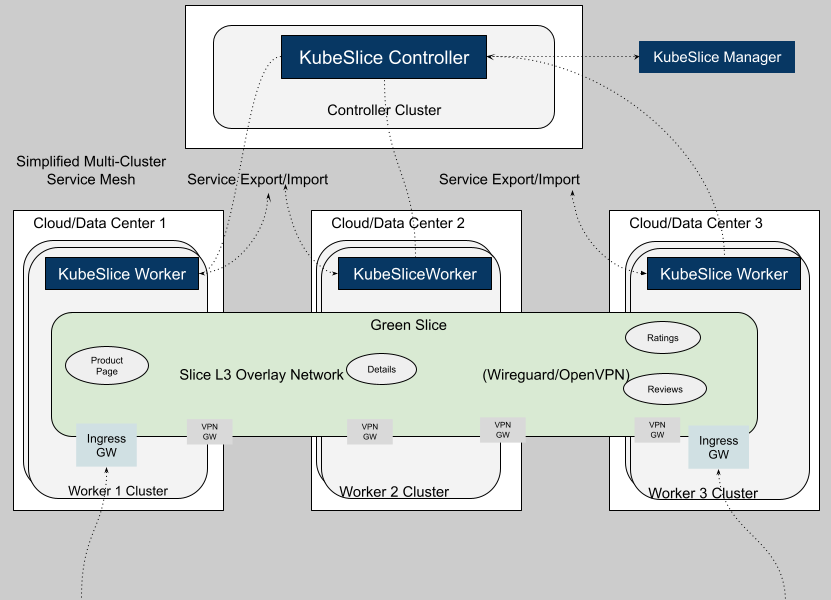
Slice with Single-Network Overlay
This option is also referred to as Overlay Connectivity. In this mode a single, flat, overlay network is deployed across all the clusters associated with a slice. The Application pod-to-pod connectivity is provided at L3, with each pod receiving a unique slice overlay network IP address. The service discovery relies on the slice DNS to resolve service names exposed on a slice.
Slice with Multi-Network Overlay
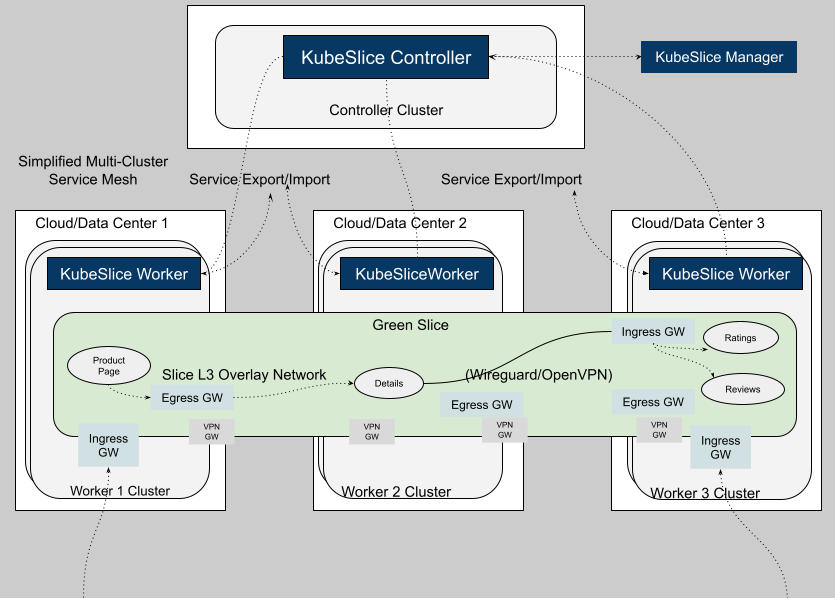
This option is also referred to as Service Mapped Connectivity. It sets up the inter-cluster connectivity for applications by creating and managing a network of ingress and egress gateways based on the Gateway API. The pod-to-pod connectivity is provided at L7 for HTTP and HTTPS protocols. Unlike the single-network option, there is no flat inter-cluster network at L3 for Application Pods. The L3 overlay is only between the gateways. The service discovery for application services exposed on a slice is provided through local cluster IP services.
Difference Between Single-Network and Multi-Network Overlay
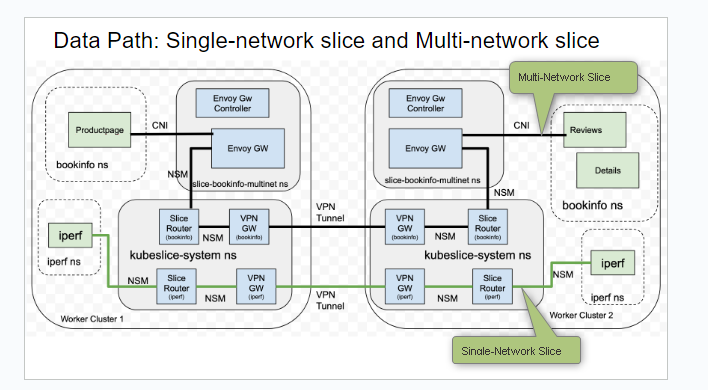
The figure below illustrates the difference between the single-network and multi-network overlay.
| Single-Network Slice | Multi-Network Slice |
|---|---|
| There is single flat overlay network and pod-to-pod connectivity is at L3. | The pod to pod connectivity across clusters is set up through a network of L7 ingress and egress gateways. There is no L3 reachability. |
| The application pod receives a new interface and an IP address. | The application pod is left untouched. There is no new interface injection or new IP address for the pod. |
| The application service discovery is through KubeSlice-DNS and service import/export mechanism. There is no cluster IP address. | The application service discovery is through the local cluster IP service and Kubernetes-DNS. |
| HTTP, HTTPs, TCP, and UDP are the supported protocols. | Only HTTP and HTTPs are the supported protocols. |
IP Address Management
IP Address Management (IPAM) is a method of planning, tracking, and managing the IP address space
used in a network. On the KubeSlice Manager, the Maximum Clusters parameter of the slice creation
page helps with IPAM. The corresponding YAML parameter is maxClusters.
The Maximum Clusters parameter defines how many worker clusters can connect to a slice. It affects subnet calculation, which determines the number of host addresses available to each cluster's application pods.
For example, if the slice subnet is 10.1.0.0/16 and the maximum clusters is 16, each cluster receives a
subnet of 10.1.x.0/20, where x = 0, 16, or 32.
This parameter can be configured only at slice creation and defaults to 16. The supported range is 2 to 32.
The Maximum Clusters parameter is immutable after slice creation. Fewer clusters means more IP addresses per cluster, so choose wisely.
Connectivity to Clusters in Private VPCs
In addition to connecting public clusters, KubeSlice can also be used to connect clusters that are enclosed within a private VPC. Such clusters are accessed through network or application Load Balancer that are provisioned and managed by the cloud provider. KubeSlice relies on network Load Balancers to setup the inter-cluster connectivity to private clusters.
The following figure illustrates the inter-cluster connectivity set up by KubeSlice using a network Load Balancer (LB).
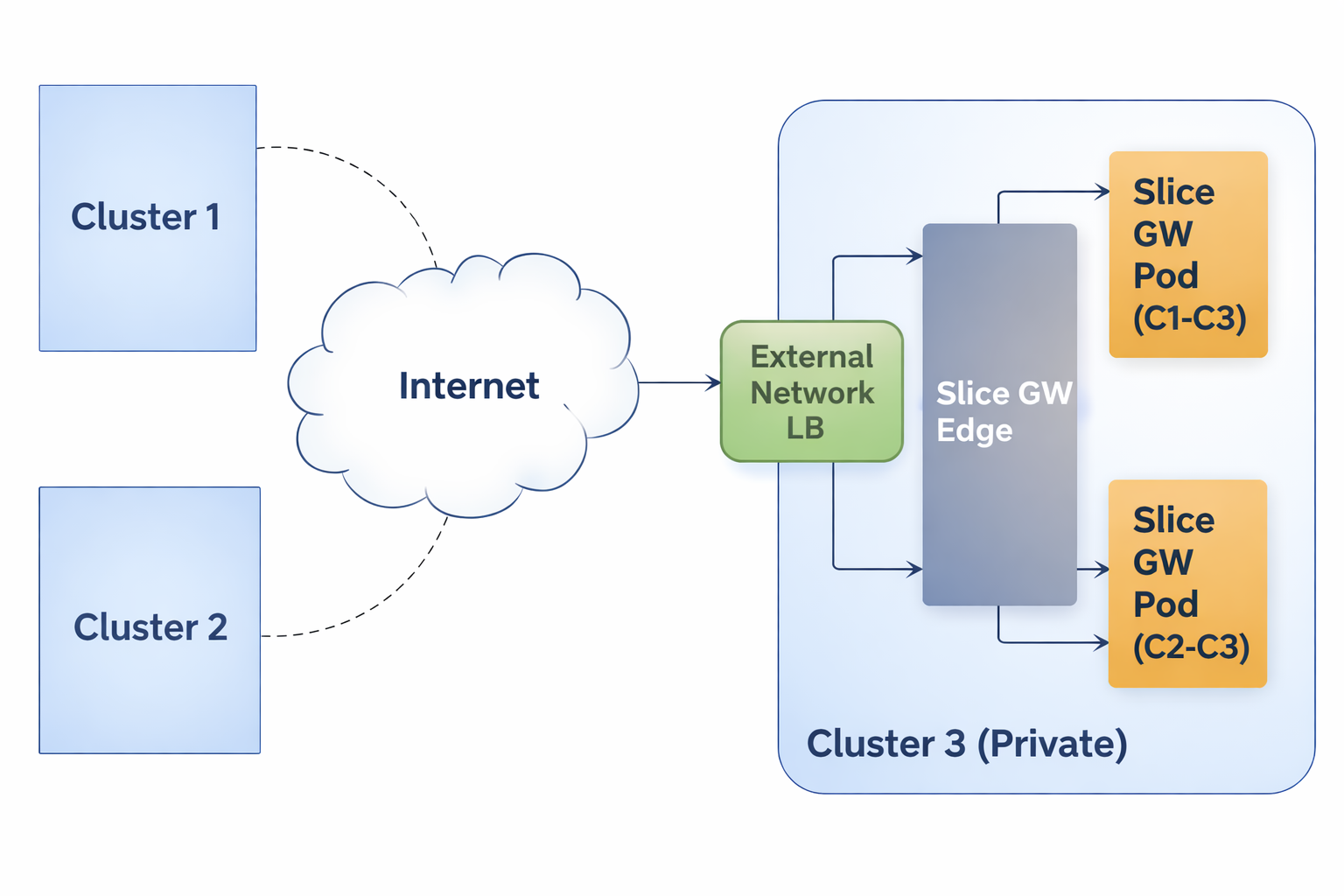
Users can specify the type of connectivity for a cluster. If the cluster is in a private VPC, the user can utilize the
LoadBalancer connectivity type to connect it to other clusters. The default value is NodePort. The user can also configure the gateway
protocol while configuring the gateway type. The value can be TCP or UDP. The default value is UDP.
Managed Services Gateway
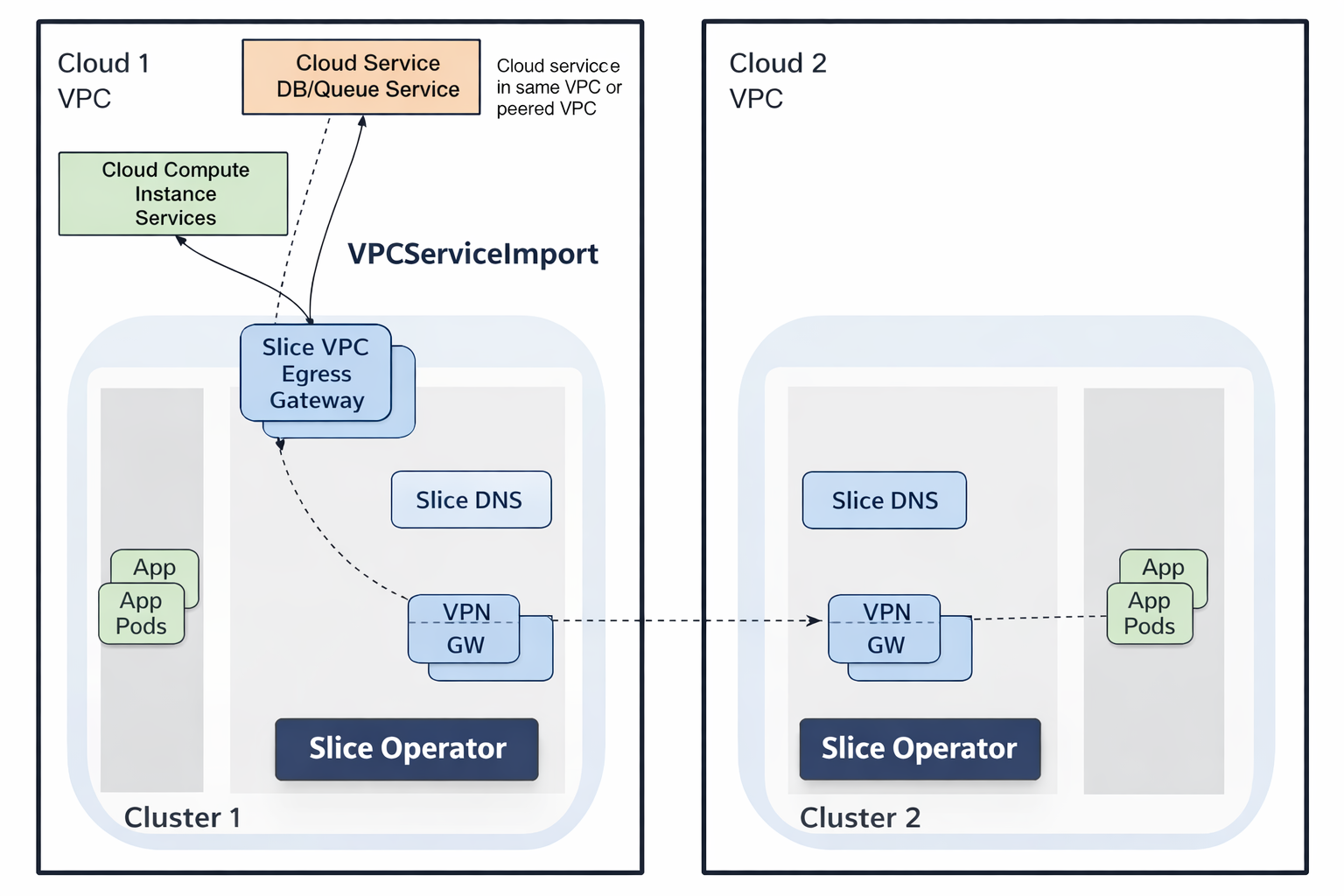
KubeSlice provides access to private cloud managed services in a VPC through an Envoy-Proxy-based egress gateway. The VPC egress gateway feature enables users to import a private managed service running outside a Kubernetes cluster into a slice. This allows the application pods running in remote clusters to access the managed service through the slice network.
When a worker cluster with direct access to the cloud managed service in its own VPC is connected to a slice, all the other worker-clusters that are part of the same slice can now access the managed service.
The following figure illustrates how application pods access a cloud-managed service that is onboarded onto a slice.